
Rapid Deployment
One of the core features of openmcp-sdk is rapid deployment. Leveraging its interoperability with openmcp-client, you can complete the deployment of an MCP Agent in as little as 10 seconds.
1. Export mcpconfig.json from openmcp
First, open your debugged MCP project in openmcp. Assume you have achieved satisfactory debugging results during interactive testing.
At this point, click the small rocket-like icon on the far right of the dialog toolbar, and you will see a window like this:

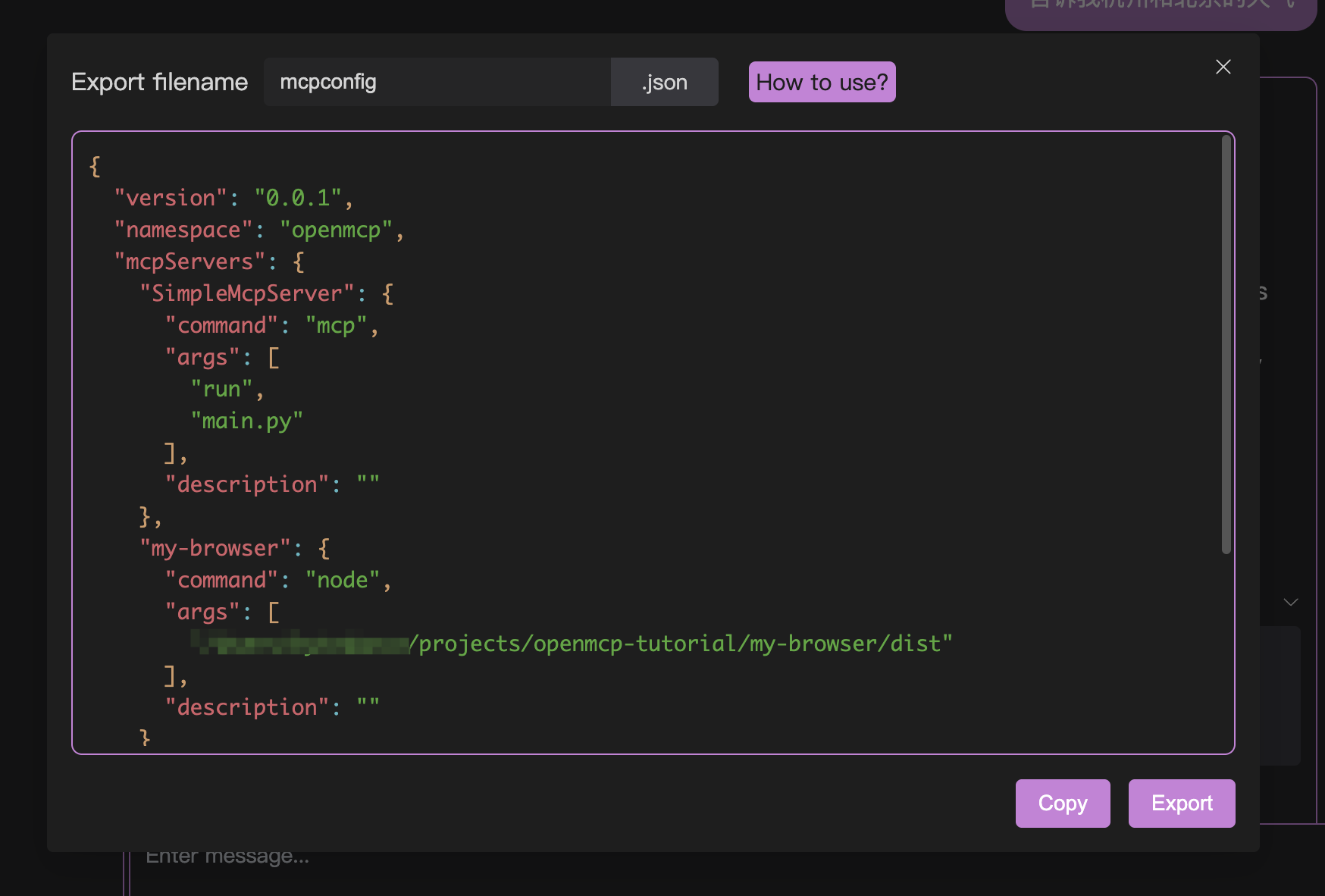
You can obtain an mcpconfig.json file by clicking either Copy or Export.
2. Deploy to openmcp-sdk
Then we create a file named main.ts. With just a few lines of code, you can deploy the above configuration as an agent:
import { OmAgent } from 'openmcp-sdk/service/sdk';

const agent = new OmAgent();
agent.loadMcpConfig('./mcpconfig.json');
const res = await agent.ainvoke({ messages: 'What is the weather like in Hangzhou today?' });

console.log('⚙️ Agent Response', res);
Run it using npx tsx main.ts, and you will get the following result:
[2025/6/22 19:05:08] 🚀 [SimpleMcpServer] 1.9.2 connected
[2025/6/22 19:05:11] 🤖 Agent wants to use tools(1) weather
[2025/6/22 19:05:11] ✅ weather
⚙️ Agent Response Today in Hangzhou, the weather is light rain with a temperature of 24.7°C, humidity at 95%, and an air quality index (AQI) of 26, indicating good air quality.
MCP Server Management
If there are many MCPs in the project, we recommend using the name for indexing. To do this, you need to implement a search program for MCP configuration files. Below is just a simple example:
File name: util.ts
import path from 'path';

const __dirname = path.dirname(import.meta.filename);

export const MCP_CONFIG_HOME = path.resolve(__dirname, '..', 'openmcp');

export function useMcpConfig(name: string) {
    return path.join(MCP_CONFIG_HOME, name + '.json');
}
File name: main.ts
import { useMcpConfig } from './util';

const agent = new OmAgent();
agent.loadMcpConfig(useMcpConfig('word-mcp'));

const prompt = await agent.getPrompt('word_operations_prompt', {});
const query = prompt + '\n' + userInput;

const result = await agent.ainvoke({
    messages: query,
});

console.log('test result: ', result);
In large-scale MCP usage, this will be a good practice. Of course, for industrial-grade projects, you can also consider developing an MCP gateway system to achieve more professional service hosting and access.
 LSTM-Kirigaya (锦恢)